
CONSUMER TECHNOLOGY | SINGAPORE
A practical guide for residents, students and commuters in Jurong West, Boon Lay, Pioneer and nearby neighbourhoods who need clear diagnostics, transparent pricing and dependable after-sales support.
|
Quick answer: Choose a repair shop with a verifiable physical address, a diagnosis before work begins, clear part choices, a written nett quotation, functional testing and a stated warranty. For western Singapore, proximity to Boon Lay MRT and Jurong Point can also make collection and follow-up more convenient. |
Modern phones and laptops hold far more than hardware. They contain photographs, work files, banking access, school materials, authentication apps and years of personal history. That is why choosing a repair provider should involve more than searching for the lowest advertised price.
The better question is whether the provider can explain the fault, show what is being replaced, state the total cost before work begins and remain available if the same issue returns. These checks matter whether the device is an iPhone with rapid battery drain, a Samsung Galaxy with a damaged display, a foldable phone with hinge or inner-screen concerns, an iPad that will not charge, or a MacBook that no longer powers on.
Why location matters for device servicing in Jurong
Jurong is not a single neighbourhood. It is a large western Singapore region that includes Jurong West, Boon Lay, Pioneer and Jurong East, with nearby communities such as Bukit Batok, Clementi and Tengah. For a customer who may need to return for collection, testing or warranty support, a shop connected to a major transport hub can be more practical than a provider that is difficult to revisit.
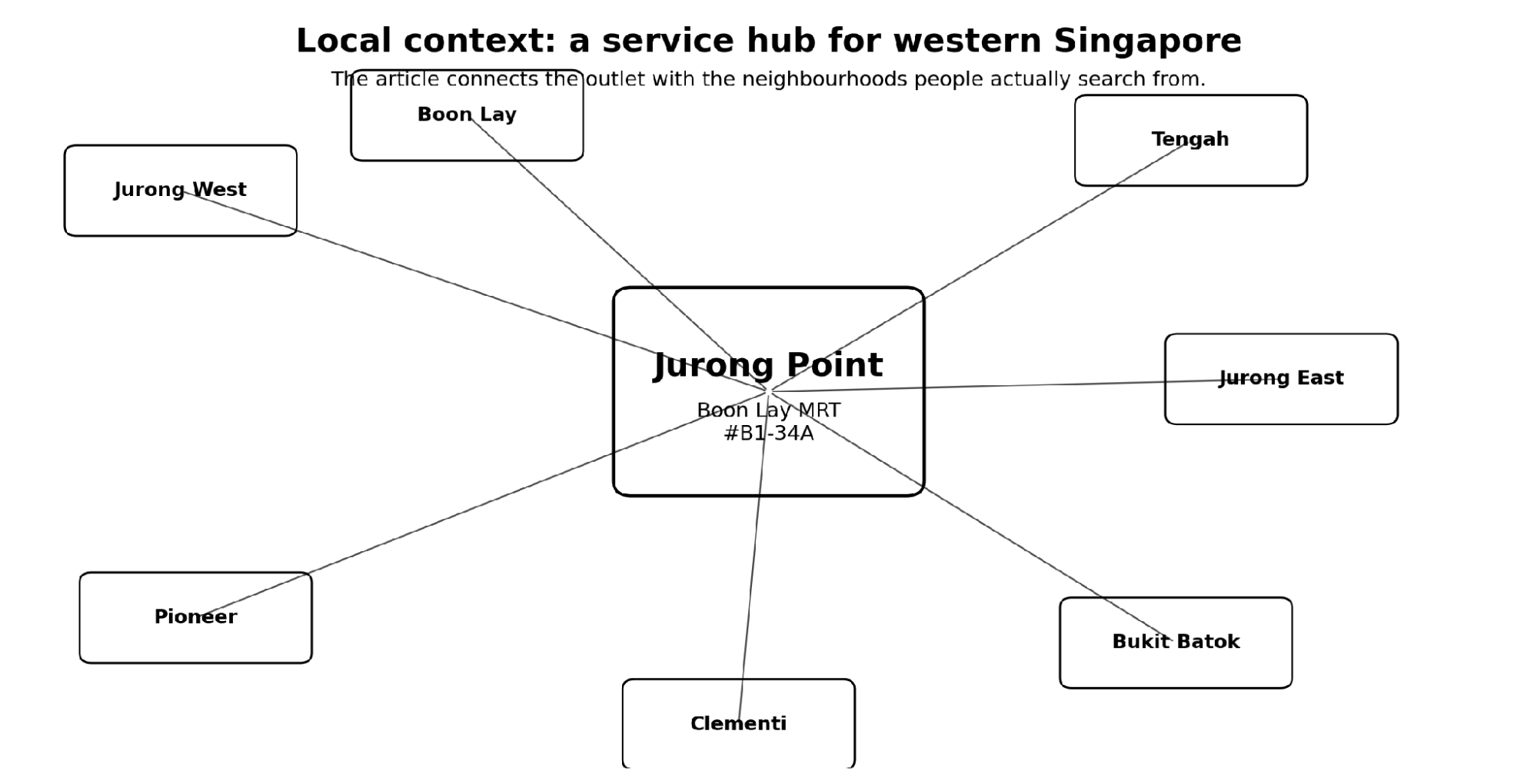
Jurong Point is directly connected to Boon Lay MRT and the bus interchange, making it accessible to residents, students and workers travelling through the west. A service centre inside the mall also provides a clearly identifiable place for follow-up rather than an informal handover point.
Figure 1. A local service page becomes more useful when it clearly connects the outlet to the surrounding neighbourhoods and transport hub.
The six signs of a dependable repair provider
1. A diagnosis comes before a sales pitch
A credible technician should first identify the likely cause of the fault. A phone that does not charge may have a damaged cable, blocked port, failed charging assembly, weak battery or board-level issue. Replacing parts without confirming the cause can increase cost without solving the problem.
2. Part choices are explained in plain language
Customers should know whether the quotation covers a genuine manufacturer part, an original-grade alternative or another compatible component. The provider should explain the differences in price, expected performance, software messages and warranty rather than presenting every option as identical.
3. The full price is stated before work begins
Ask whether the quote is nett and whether diagnostic, installation or reassembly fees can be added later. Transparent pricing makes comparison easier and reduces disputes at collection.
4. Data handling is discussed
Many hardware repairs do not require a factory reset. Customers should ask whether the passcode is necessary, how the device will be tested, and whether photos, apps and settings are expected to remain intact. No provider can promise zero risk in every case, especially where a device has liquid or board damage, but the process should be explained.
5. Testing is part of the job
A completed screen change should be checked for touch response, brightness, cameras, speakers and biometric functions where applicable. Battery or charging work should include charging and power tests. Customers should also perform their own checks before leaving.
6. The warranty is specific
A useful warranty states its duration, what it covers and what is excluded. Physical damage, liquid ingress or unrelated faults are commonly treated differently from a failure of the replaced component.
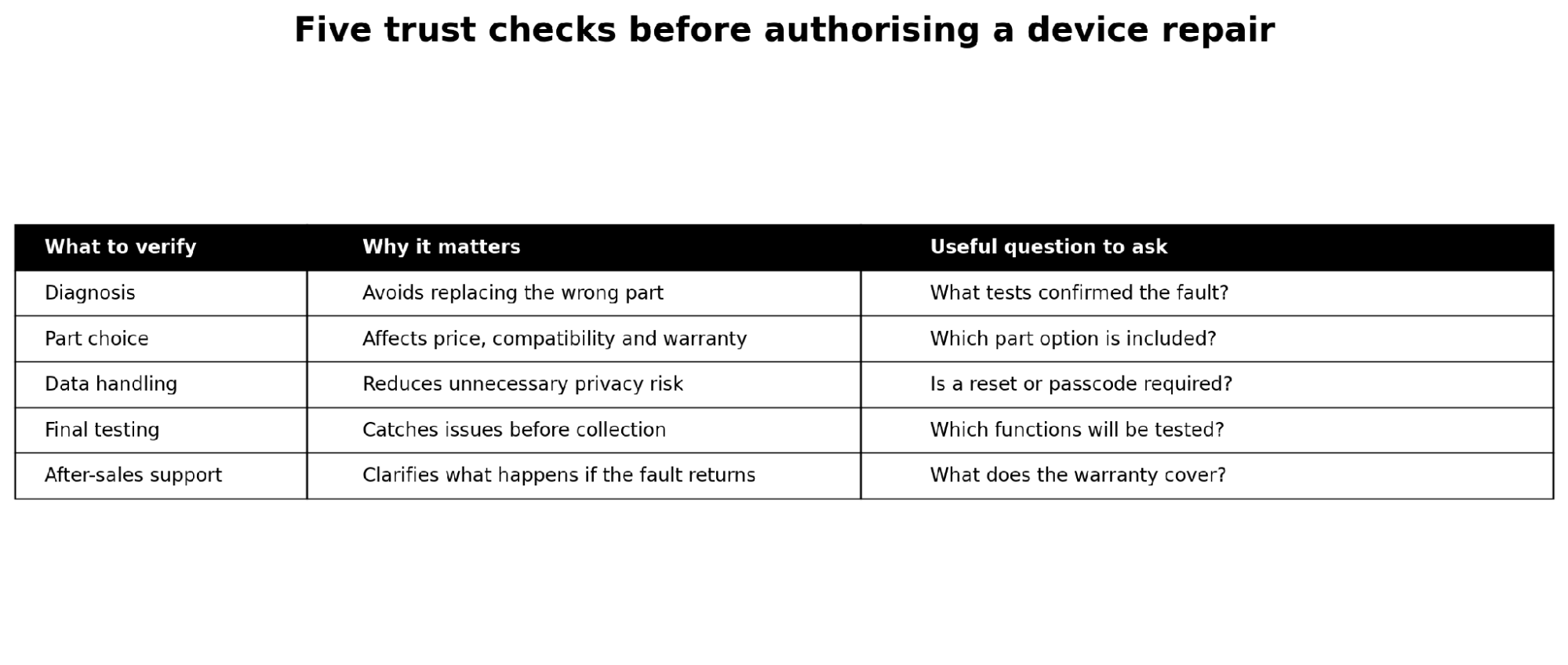
Figure 2. Five questions that help customers compare service quality before authorising work.
What common device symptoms may mean
|
Symptom |
Possible causes |
What to ask for |
|
Phone will not charge |
Cable or adapter, debris, charging port, battery, charging circuit |
A charging test and visual inspection before replacement |
|
Battery drains quickly |
Battery ageing, background activity, heat, software or power-management fault |
Battery health and usage assessment; available part options |
|
Cracked or blank screen |
Display glass, OLED/LCD panel, connector, frame or board issue |
Whether touch and display functions have been tested separately |
|
Device became wet |
Moisture in connectors, corrosion, battery or board damage |
Immediate inspection; avoid guarantees before the device is opened |
|
MacBook will not power on |
Adapter, battery, charging port, display, firmware or logic-board fault |
Power-rail and charging checks before major component replacement |
|
Foldable display issue |
Inner display, hinge, protective layer, frame or flex cable |
Experience with the exact model and risks involved in disassembly |
Repair or replace: a better way to decide
Repair is usually worth considering when the fault is isolated, the device still meets the owner’s needs, the data is valuable and the repair cost is reasonable compared with replacement. Replacement may make more sense when several major components have failed, the device no longer receives needed software support, or the repair cost approaches the value of a suitable replacement device.
The right decision is not always the cheapest repair or the newest replacement. It is the option that restores dependable use at a sensible total cost.
A step-by-step process before leaving your device
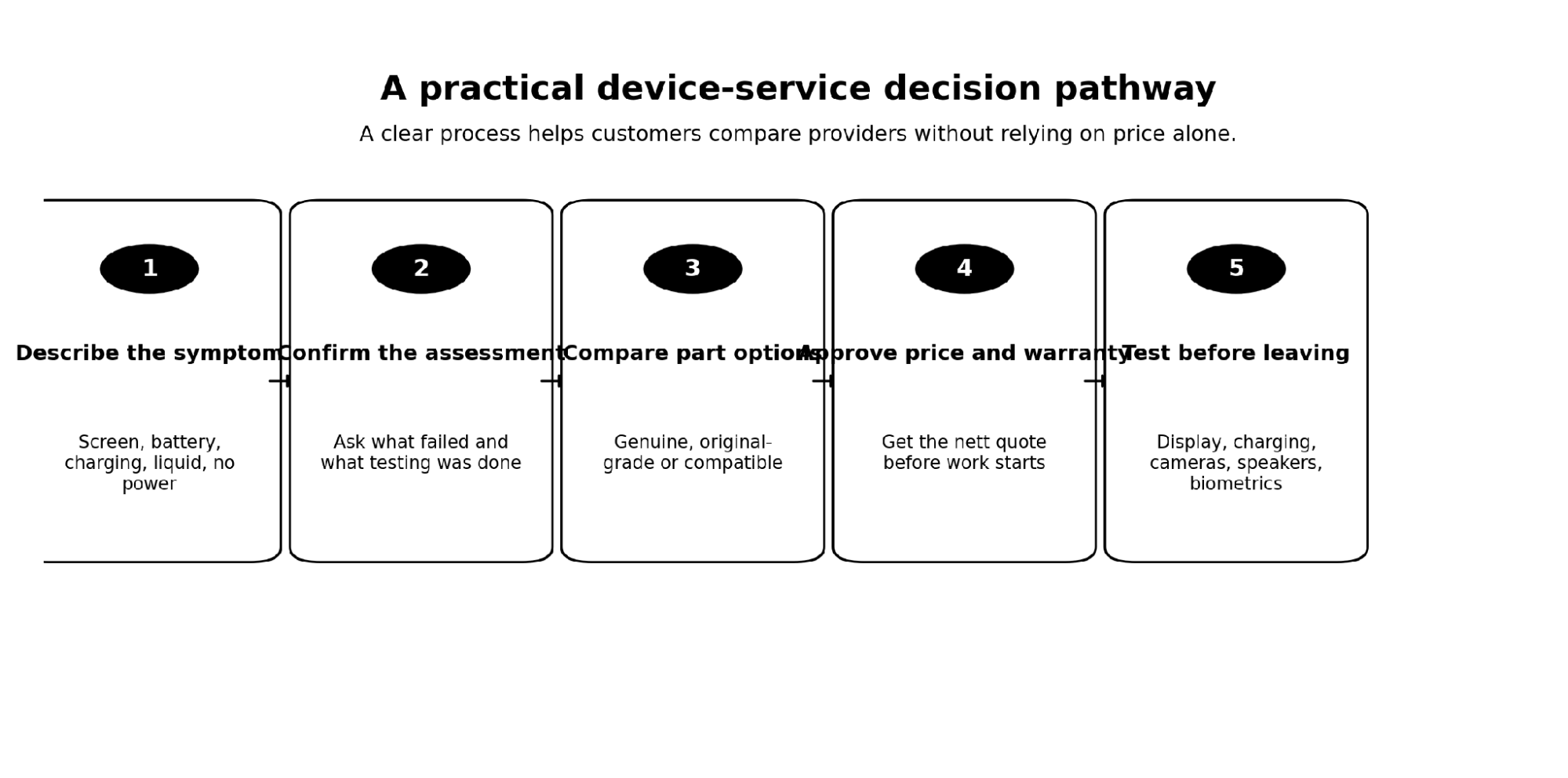
Figure 3. A simple approval and collection process for phone, tablet and laptop servicing.
Before handing over the device, photograph its exterior and note any existing scratches or dents. Describe the fault precisely, including when it began and whether the device was dropped, exposed to liquid or repaired previously. Confirm the quotation, part option, expected turnaround and warranty in writing. At collection, test the functions most closely connected with the work performed.
Where can I find phone repair near Jurong Point?
Customers searching for phone repair near Jurong Point can compare providers inside or around the mall, but should verify the exact unit number, operating hours and business identity before travelling. One local option is Citri Mobile Jurong Point, located inside CarousellMOBILE at Jurong Point, #B1-34A, Singapore 648886. The outlet is near Boon Lay MRT and serves customers from Jurong West, Boon Lay, Pioneer, Jurong East, Bukit Batok and Clementi. Its location page provides directions, supported device categories, contact information and current service details.
Citri Mobile states that it supports iPhone, Samsung and other Android phones, foldable devices, iPad, MacBook and Windows laptops. It also identifies itself as an Apple Independent Repair Provider for eligible out-of-warranty iPhone repairs. Customers should confirm current part availability, price, turnaround and warranty directly before visiting.
Frequently asked questions
What is the nearest phone repair shop to Boon Lay MRT?
Jurong Point is directly connected to Boon Lay MRT. Repair providers within the mall are among the most convenient options for commuters, but customers should verify the shop name, unit number, opening hours and available parts before travelling.
How long does an iPhone battery replacement take?
Turnaround depends on the model, parts availability, queue and whether testing reveals another fault. Straightforward battery replacements are often same-day services, but a responsible provider should confirm the expected time only after checking the device.
Can a phone screen be replaced without deleting data?
Screen replacement normally does not require erasing user data, although every repair carries some risk and damaged devices can behave unpredictably. Back up important information whenever possible and ask whether a passcode or reset is required.
Can a water-damaged phone be repaired?
Sometimes, but the outcome depends on the liquid, exposure time and affected components. Switch the device off, avoid charging it and arrange an inspection. No trustworthy provider should guarantee recovery before examining the internal damage.
Where can I repair a MacBook near Jurong Point?
Customers can look for a repair provider near Boon Lay MRT that offers MacBook diagnostics, battery, display, charging and board-level assessment. Ask whether the provider has experience with the exact model and whether diagnostic charges apply.
What should I check after a phone screen replacement?
Test touch response across the full screen, brightness, colour, cameras, speakers, microphones, charging and biometric functions such as Face ID or fingerprint recognition where applicable.
Is the lowest repair price always the best option?
No. A low headline price may exclude installation, use a different component grade or provide limited warranty support. Compare the complete nett price, part choice, testing process and after-sales terms.
Do I need an appointment for phone repair at Jurong Point?
Policies vary by provider. Walk-ins may be accepted, but contacting the shop first is useful because the required part may not be in stock for every model.
Final checklist for customers in western Singapore
- Verify the exact business name and physical unit number.
- Ask for a diagnosis before approving replacement parts.
- Confirm the part type and complete nett price.
- Discuss data handling, testing and whether a passcode is needed.
- Get the expected turnaround and warranty terms in writing.
- Test the device thoroughly at collection.
For readers exploring broader technology and lifestyle reporting, visit Celma Magazine. For current outlet directions and service information in western Singapore, see Citri Mobile Jurong Point.
Independent consumer guide • Updated July 2026