
- Manual DMARC (Domain-based Message Authentication, Reporting, and Conformance) setup only gives you a text record, not a full DMARC service, meaning you'll get buried in unreadable XML files without a dashboard to parse the data.
- Rushing to a strict enforcement policy without a monitoring tool will almost certainly block your own critical tools like marketing or invoicing platforms.
- Platforms like PowerDMARC and EasyDMARC let you modify your configurations directly inside a dashboard, removing the risk of breaking your live DNS zone files.
- Expect the transition to full enforcement to take anywhere from two to six weeks so you can safely identify every single legitimate email sender.
A DMARC provider handles the reporting, monitoring, and policy management that turns a published record into working protection. DMARC enforcement is no longer optional: Google, Yahoo, and Microsoft all require it for bulk senders, and setting up a DMARC record manually is only the start. Here are the leading DMARC solutions for small and mid-size businesses.
According to the Verizon Data Breach Investigations Report (DBIR), phishing remains one of the top vectors for initial organizational compromise. Deploying a strong email authentication strategy is a foundational step in mitigating this specific threat vector.
Why Do SMBs Need More Than Just a DMARC Record?
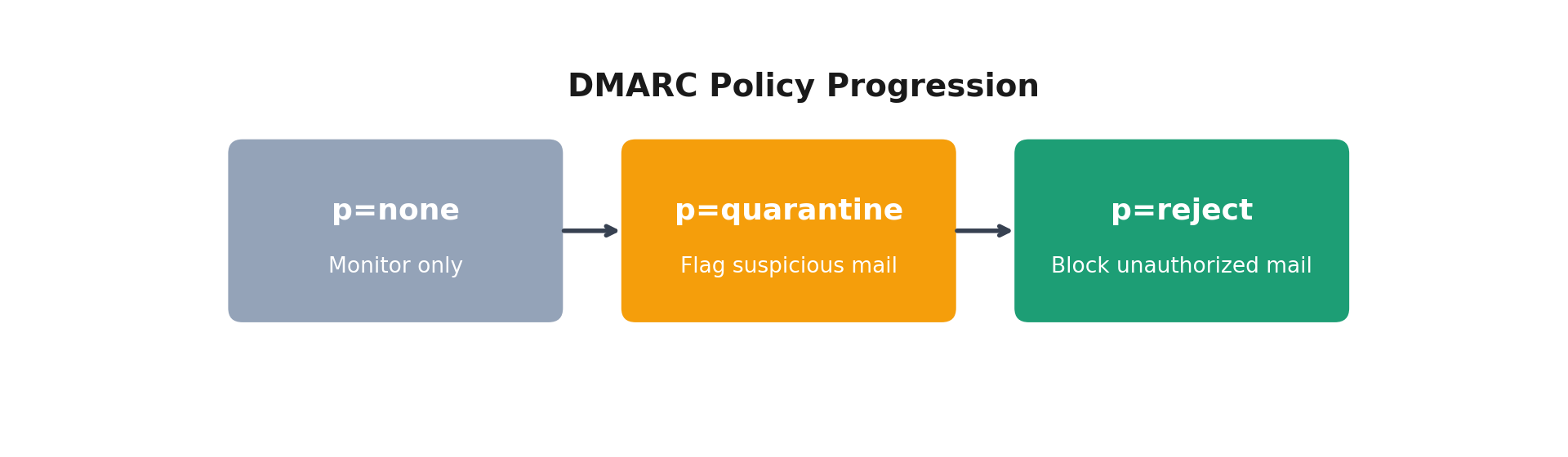
- A DMARC record at p=none is free to publish, but it is strictly a monitoring state that watches traffic without taking protective action.
- A DMARC report (RUA, or Reporting URI for Aggregate data) is a raw XML file, virtually unreadable without a dedicated parsing dashboard to translate it into human-readable tables.
- Moving safely to p=reject requires identifying every legitimate email source first. Rushing to enforcement without visibility will accidentally block your own critical invoices, marketing tools, or CRM emails.
- Without monitoring, you won't know when authentication breaks or new senders appear. Third-party services frequently update their IP ranges, which can suddenly break your SPF (Sender Policy Framework) setup.
- A DMARC provider automates the reporting, alerts, and policy progression that manual setup can't. It gives you the clear insight needed to advance from monitoring to full protection without breaking business communication.
Illustrative example: a 40-person SaaS company might start at p=none with a free monitoring tool, spend two to three weeks authenticating its email marketing and support platforms, then move to p=reject once its DMARC provider confirms no legitimate mail is being blocked.
Top DMARC Providers for SMBs
PowerDMARC
PowerDMARC, an email authentication platform, focuses heavily on consolidating full-stack email security protocols into a single managed dashboard. Instead of only handling DMARC aggregation, the system groups multiple core protocols together to provide a comprehensive management layer.
- Full-Stack Protocol Management: Centralizes the configuration, monitoring, and analysis of DMARC, SPF, DKIM (DomainKeys Identified Mail), BIMI (Brand Indicators for Message Identification), MTA-STS (Mail Transfer Agent Strict Transport Security), and TLS-RPT (TLS Reporting) in one control panel.
- Hosted DMARC and Hosted SPF: Standard setups require editing raw DNS TXT records through your registrar whenever a sending service changes, creating risks of formatting errors or hitting the hard 10-DNS-lookup limit. PowerDMARC updates these records directly from its dashboard, pushing changes automatically without manual DNS edits.
- AI-Powered Analysis & Threat Intelligence: Uses an AI-driven report analysis tool to parse daily XML files, map out clear sender identities, and match data against real-time threat intelligence feeds to isolate malicious IPs or spoofing sources.
- Real-Time System Alerting: Features granular alert triggers that notify IT leads immediately via email or web hooks when a new unauthorized sender appears, authentication fails, or unexpected DNS policy changes occur.
- Unrestricted Public Diagnostics: Offers standalone tools (including a DMARC checker, domain analyzer, email header analyzer, and BIMI validator) accessible directly on their site without requiring an active platform login.
- Best for: SMBs wanting full-stack management with hosted records, actionable reporting, and built-in threat intelligence.
EasyDMARC
EasyDMARC targets IT admins and operations managers who need a clean, approachable dashboard built for non-technical users or small teams. The platform minimizes configuration complexity by focusing on clear, visual breakdowns of active data streams.
- User-Friendly Reporting: Translates raw DMARC aggregate reports into clean visual dashboards, grouping email traffic by sending sources and checking source alignment metrics natively.
- DMARC Failure Reports: Provides specialized source investigation tabs that isolate specific failed messages to help pinpoint the exact root causes of authentication failures.
- EasySPF Dynamic Flattening: Includes built-in hosted SPF record tools that dynamically flatten long include structures into clean IP lists, permanently preventing the standard "too many DNS lookups" permerror from breaking delivery.
- Managed DKIM & Selector Detection: Simplifies ongoing key management by automatically tracking active DKIM selectors across multiple domains to prevent key expiration issues.
- Reputation & Blacklist Tracking: Continuously monitors domain and IP health against known third-party blocklists, alerting administrators the moment a sending asset experiences a reputation drop.
- Best for: Solo admins or small teams that want a simple, low-friction onboarding experience.
Dmarcian
As one of the original dedicated DMARC service providers in the industry, Dmarcian has established a deep footprint supported by strong documentation, deployment guides, and community resources. The platform specializes primarily in aggregate report parsing.
- Specialized Aggregate Parsing: Focuses tightly on processing XML data streams to build a comprehensive, visual inventory of an organization's entire email ecosystem.
- Domain Overview & Grouping: Organizes assets by deployment status, data sources, and organizational units, which helps teams identify shadow IT tools sending mail on their behalf.
- DMARC-First Architecture: Places its engineering emphasis directly on DMARC compliance, offering fewer automated dashboard utilities for secondary configurations like automated BIMI deployment or hosted MTA-STS.
- Deep Documentation Library: Features extensive guides and community forum resources detailing source remediation steps for a wide variety of global third-party email tools.
- Best for: Teams already familiar with DMARC who want clean report visualization without extras.
Valimail
Valimail centers its core platform functionality around automated sender identification and automated enforcement workflows. It is designed to largely eliminate the manual task of reviewing and approving individual sending services.
- Automated Discovery Engine: Automatically cross-references incoming server traffic against a massive directory of known global cloud service providers, sorting legitimate systems from spoofing vectors without manual IP mapping.
- Continuous Policy Automation: Manages SPF configuration fields automatically through an inline cloud engine, allowing companies to scale their cloud service footprint without manually updating DNS TXT character limitations.
- Instant Alignment Checkers: Features continuous validation of SPF and DKIM alignment rules to ensure the domain in the "Header From" consistently matches transmission envelopes.
- Enterprise-Grade Focus: Built primarily to accommodate large ecosystems, carrying a higher entry cost that aligns more closely with mid-market teams than highly budget-conscious micro-businesses.
- Best for: Larger SMBs with complex sending environments needing automated discovery.
Proofpoint Email Fraud Defense
Proofpoint Email Fraud Defense brings enterprise-grade DMARC monitoring into play, but explicitly bundles it alongside broader email security infrastructure components. The solution offers strong reporting analytics and extensive visibility into threat actor behavior.
- DMARC Failure Reports Capabilities: Provides detailed analysis of failed delivery paths, highlighting exactly where malicious actors are initiating spoofing attempts or brand abuse campaigns.
- Unified Security Footprint: Integrates authentication monitoring directly into broader enterprise email security suites, tying incoming DMARC telemetry into existing perimeter gateway tools.
- Lookalike Domain Identification: Works alongside corporate defensive systems to catch lookalike domains or inbound lookalike configurations that target internal staff members.
- High Infrastructure Complexity: Requires significant technical overhead to deploy and maintain, which makes it an intensive setup for standard small business environments unless they already run Proofpoint solutions.
- Best for: SMBs that already use Proofpoint and want DMARC within an existing security stack.
Quick Comparison: SMB-Focused Features
|
Feature |
PowerDMARC |
EasyDMARC |
Dmarcian |
Valimail |
Proofpoint EFD |
|
Hosted Records (No Manual DNS Edits) |
Yes |
Yes |
No |
Yes |
Yes |
|
Free Tier / Free Tools Available |
Yes (Free Tools) |
Yes (Free Plan) |
Yes (Trial) |
No |
No |
|
Full-Stack (DMARC+SPF+DKIM+BIMI) |
Yes |
No |
No |
No |
No |
|
AI-Powered Reporting |
Yes |
No |
No |
No |
No |
|
Simplest Onboarding Experience |
Balanced |
Yes |
Moderate |
Automated |
Complex |
Pricing across these platforms generally follows a freemium pattern: free monitoring or diagnostic tools at the entry level, with paid tiers unlocking hosted records, additional domains, and automation as your sending footprint grows.
What Happens After You Choose a DMARC Provider?
- Step 1: Connect your domain. The platform reads your current DNS records and provides a custom tracking record to place inside your DNS registrar zone file.
- Step 2: Aggregate reports begin flowing in. Over the next 24 to 72 hours, incoming XML files generate data in your dashboard, identifying your actual active sending sources.
- Step 3: Work through unknown or unauthorized senders. You review the detected streams, authenticating legitimate third-party tools (like Mailchimp, HubSpot, or Microsoft 365) using proper SPF and DKIM configurations before changing policy rules.
- Step 4: Move to enforcement safely. You graduate your policy string from p=none over to p=quarantine for a brief monitoring phase, then advance to full p=reject to completely block unauthorized traffic.
The typical timeline to achieve full, safe enforcement with a managed provider generally ranges between 2 to 6 weeks, depending on how many cloud services your business uses.
Choosing the Right Fit
There's no single best DMARC provider for every SMB: PowerDMARC and EasyDMARC both suit teams starting from scratch, Dmarcian fits teams that already understand their DMARC data, and Valimail or Proofpoint make more sense once your sending environment gets complex. Whichever DMARC provider you evaluate, look for hosted records, clear reporting, and a guided path from monitoring to enforcement, then confirm it covers SPF and DKIM alongside DMARC before you commit.
FAQ
Do I need a paid DMARC provider if I already have a DMARC record?
Yes, if you want to actually use the data. A standard DMARC record just tells inbox providers where to send XML report files. Without a dedicated provider to parse these daily text files, you are left with thousands of rows of unreadable raw data, making it incredibly difficult to safely move your policy past p=none.
What is the difference between PowerDMARC and EasyDMARC?
While both platforms offer hosted record features, PowerDMARC acts as a full-stack platform covering advanced protocols like automated BIMI, MTA-STS, and AI-driven threat parsing out of one box. EasyDMARC focuses more intently on an ultra-simplified visual dashboard tailored primarily toward solo admins looking for a quick, low-friction setup.
Is there a free DMARC provider for small businesses?
Several platforms offer restricted free tiers or public investigation toolkits. EasyDMARC features a limited free plan for basic visibility, while platforms like PowerDMARC provide specialized standalone utilities (such as a DMARC checker and domain analyzer) completely free without an account signup.
How long does it take to reach p=reject with a managed provider?
For a typical small business, the timeline usually spans 2 to 6 weeks. This buffer is critical because it allows enough aggregate reports to roll in across different billing or marketing cycles, ensuring no legitimate third-party sending tool is accidentally blocked when the strict rejection policy goes live.
Can I switch DMARC providers later without losing my data?
You can change your provider at any point by updating the reporting URIs inside your domain's DNS TXT record. However, historical parsed data stays inside the old provider's dashboard, so you will want to export your historical analytical reports before making the final switch.